Best Travel Planning Apps for Friends in 2026 ⭐
Planning a trip with friends should be exciting, not exhausting. But between coordinating schedules, splitting costs, finding places everyone likes, and keeping track of bookings - it quickly becomes a full-time job.
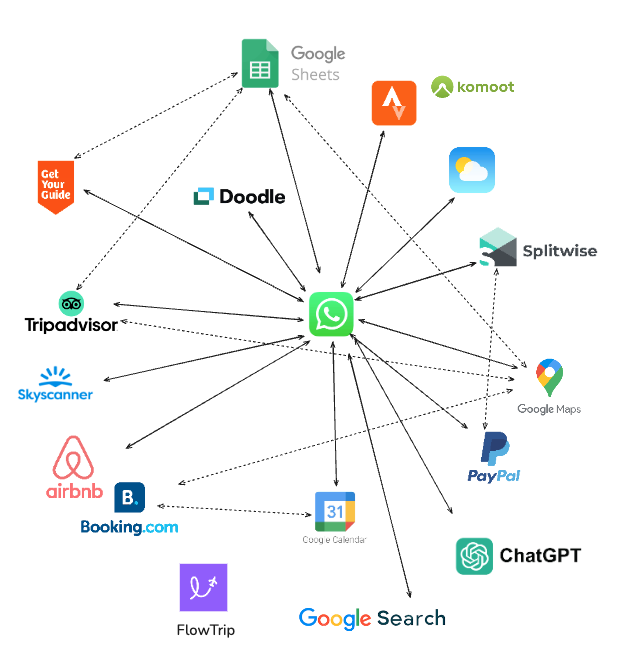
Quick Comparison
| App | Best For | Price | Rating |
|---|---|---|---|
| Airbnb Lists | Accommodation research | Free | ⭐ 4.5 |
| FlowTrip | Complete trip planning & coordination | Free | ⭐ 4.8 |
| Google Maps | Navigation & location sharing | Free | ⭐ 4.6 |
| Tricount | Expense splitting | Free, Pro $5/yr | ⭐ 4.7 |
| Troupe | Date & destination voting | Free | ⭐ 4.3 |
Detailed App Reviews
1. FlowTrip
Best all-around trip planner with AI suggestions and group coordination
- 🗺️ Clean Itinerary and Map overview - everyone knows where to be, no one gets lost in the chat
- 📸 Build your trip by uploading Screenshots - no typing needed, just drop your restaurant reservation
- 🤖 AI Trip Idea Check - validates your trip based on your preferences, destination and season
- ✨ AI Recommendations - restaurants, hotels, coffee spots, activities based on your preferences
- 🗳️ Polls and voting - just suggest an activity and decide together
- 💬 Built-in chat - keep all trip conversations in one place
- 💰 Expense tracker - split costs and track spending
- 🎒 AI Packing list - never forget essentials, AI will help you take care of it
- ☀️ Weather Forecast - You will know if the weather changes
What sets FlowTrip apart: Instead of spending 2 hours researching and typing out every detail, just fill out your preferences in 10 seconds and AI will create a personally tailored itinerary. Or you can just upload screenshots of your flight confirmations, hotel bookings, or event tickets. FlowTrip's AI automatically extracts the information and builds your itinerary. Then it adds relevant suggestions - restaurants near your hotel, activities that match your group's vibe, coffee shops along your route.
The AI Trip Idea Check is a game-changer. Thinking about a beach trip in November? AI will tell you if that's actually a good idea based on weather patterns, budget considerations, and logistics. It's like having a travel-savvy friend review your plans before you book.
FlowTrip shines for event-based trips: music festivals (Primavera Sound, Coachella), Oktoberfest, FIFA World Cup 2026, Taylor Swift tours, and bachelor/bachelorette parties. The combination of polls, chat, and crystal-clear itineraries means everyone stays coordinated - even when cell service is spotty.
✓ Pros
- • Completely free, no ads
- • Upload screenshots instead of typing everything
- • AI does 2 hours of research in 10 seconds
- • Everyone knows where to be (clean map + itinerary)
- • All tools in one app (chat, polls, expenses, packing)
- • Perfect for large groups and events
✗ Cons
- • Not made for backpacking trips
- • Limited offline functionality
- • No web version yet (mobile-only)
Pricing: Free
Best for: Complete trip planning and coordination with friends - music festivals (Primavera Sound, Coachella), Oktoberfest, FIFA World Cup 2026, Taylor Swift tours, bachelor/bachelorette parties, friend groups (3-20 people)
2. Google Maps
Best for: Navigation, location sharing, and discovering places
Google Maps isn't just for navigation - it's become an essential travel planning companion. You can save places to custom lists, share your live location with friends, explore neighborhoods with Street View, and download maps for offline use.
The "Send to Phone" feature is incredibly handy when you're researching on your laptop and want to access directions on your phone later. Location sharing keeps everyone coordinated when you're exploring a new city, and the ability to see real-time business hours, reviews, and photos makes spontaneous decisions easier.
Pro tip: Create a shared list in Google Maps with your friends where everyone can add restaurants, bars, and attractions they want to visit. It's a simple way to crowdsource ideas without the clutter.
✓ Pros
- • Best navigation and routing worldwide
- • Offline maps for areas without service
- • Live location sharing with friends
- • Extensive reviews and photos
- • Free and works on all devices
- • Street View for exploring beforehand
✗ Cons
- • Not designed for itinerary building
- • No expense tracking or group chat
- • Lists can get messy with lots of places
- • No voting or decision-making features
Pricing: Free
Verdict: Essential for navigation and location coordination. Use it alongside FlowTrip for complete trip planning - FlowTrip for the itinerary and coordination, Google Maps for getting there.
3. Airbnb Lists
Best for: Collaborative accommodation research and wishlisting
Airbnb Lists lets you save properties to shared collections that your friends can view, comment on, and add to. It's perfect for the initial research phase when you're comparing different neighborhoods, price points, and property types.
Instead of sending endless links in the group chat ("What about this one?" "Did you see that apartment I sent yesterday?"), you can organize everything in one place. Everyone can browse options, heart their favorites, and leave comments about potential issues or highlights.
Beyond accommodations, Airbnb also has experiences and restaurants in some cities. You can save interesting activities to your lists alongside potential places to stay, making it a more comprehensive research tool.
✓ Pros
- • Easy collaborative wishlisting
- • Keep track of accommodation options
- • Add notes and comments on each property
- • Can include experiences and restaurants
- • Free to use
✗ Cons
- • Limited to Airbnb properties
- • No voting mechanism to decide
- • No integration with broader trip planning
- • Can't track what's actually booked
Pricing: Free
Verdict: Great for the accommodation research phase, but not a complete planning solution. Once you've found your place, move the details to FlowTrip to build out the rest of your trip.
4. Tricount
Best for: Tracking and splitting group expenses
Tricount is built specifically for one thing: making group expense splitting painless. You create a "tricount" for your trip, add participants, and then log expenses as they happen. Someone buys groceries? Add it. Split a taxi? Log it. Pay for accommodation? Track it.
At the end of the trip, Tricount calculates exactly who owes what to whom in the most efficient way possible. Instead of ten separate transactions, it might consolidate everything into just two or three payments. It handles different currencies, unequal splits (when someone didn't participate in an activity), and even shows you a running balance throughout the trip.
The interface is clean and straightforward - no learning curve. Everyone in your group can add expenses from their phone, attach receipts, and see the current balance in real-time.
✓ Pros
- • Super simple and intuitive
- • Handles multiple currencies
- • Optimizes who pays whom
- • Works offline (syncs later)
- • Can attach receipt photos
- • Free for basic use
✗ Cons
- • Only does expense tracking
- • No itinerary or planning features
- • Everyone needs to remember to log expenses
Pricing: Free; Pro $4.99/year (removes ads, adds export features)
Verdict: If you need detailed expense tracking with currency conversion and complex splits, Tricount is excellent. For simpler expense tracking integrated with your overall trip plan, FlowTrip's built-in expense feature might be sufficient.
5. Troupe
Best for: Voting on trip dates and destinations
Troupe was built around the idea of helping friends vote on trip dates and destinations. It's simple, lightweight, and used to fill a gap for early-stage group planning. The concept is straightforward: create a trip, suggest dates or destinations, and let everyone vote on their preferences.
However, the app hasn't received much development attention in recent years, and that shows. It can feel slow and limited, and newer alternatives have overtaken it in design and reliability. The voting mechanism works, but it lacks the polish and additional features that modern trip planning demands.
If you're already using Troupe and it works for your group, there's no urgent need to switch. But if you're starting fresh, newer apps like FlowTrip offer similar voting features alongside comprehensive trip planning tools.
✓ Pros
- • Intuitive voting and date-poll features
- • Simple interface for quick decisions
- • Free to use
✗ Cons
- • Very few updates in recent years
- • Occasional bugs and sync issues
- • Lacks full itinerary and expense tools
- • Limited to voting - not comprehensive planning
Pricing: Free
Verdict: Great idea and concept, but feels outdated today. Good for picking a weekend or destination in the early planning stages, but you'll need other tools to actually plan and execute the trip. FlowTrip offers voting features plus complete planning in one app.
How to Choose the Right Apps
🎯 The All-in-One Approach
Just use FlowTrip: If you want everything in one place - itinerary, AI suggestions, voting, chat, expenses, packing lists - FlowTrip handles it all for free. Add Google Maps for navigation, and you're set.
🛠️ The Best-of-Breed Stack
- Planning & coordination: FlowTrip
- Navigation: Google Maps
- Accommodation research: Airbnb Lists
- Advanced expense tracking: Tricount (or use FlowTrip's built-in tracker)
👥 By Group Size
- 2-4 people: FlowTrip + Google Maps covers everything
- 5-15 people: FlowTrip becomes essential for voting and coordination
- 15+ people: FlowTrip handles groups up to 50+ participants with ease
🎯 By Trip Type
- Music festivals (Primavera, Coachella, Tomorrowland): FlowTrip for coordination + Google Maps for navigation
- Bachelor/bachelorette parties: FlowTrip (AI planning + voting saves hours)
- Weekend city breaks: FlowTrip + Google Maps
- Beach vacations: FlowTrip + Airbnb Lists + Google Maps
- Outdoor adventures (hiking, skiing): FlowTrip + Google Maps offline
Ready to Plan Your Next Trip with Friends?
Stop juggling multiple apps and group chat chaos. FlowTrip brings together everything you need - AI planning, voting, shared itineraries, expenses, and real-time coordination - in one beautiful, free app.
Frequently Asked Questions
What's the best free travel planning app for friends?
FlowTrip offers the most comprehensive free tier for group travel planning with no limitations on group size or features. It includes AI planning, screenshot uploads, polls, chat, expense tracking, and packing lists - all free. Combined with Google Maps for navigation, you have everything you need at no cost.
Do I need multiple apps to plan a trip with friends?
Not necessarily. FlowTrip can handle most of your planning needs in one app. Most people use FlowTrip for overall planning and coordination, plus Google Maps for navigation. You might add Airbnb Lists during accommodation research or Tricount if you need advanced expense features, but FlowTrip + Google Maps covers 90% of what you need.
How do you split expenses on group trips?
FlowTrip has a built-in expense tracker for tracking and splitting costs during your trip. For more complex scenarios with multiple currencies and detailed tracking, Tricount is an excellent dedicated solution. Both apps make it easy to see who owes what at the end of the trip.
Can you collaborate with friends in real-time?
Yes! FlowTrip supports real-time collaboration with voting features, shared itineraries, and group chat. Everyone can add suggestions, vote on activities, and see updates instantly. Airbnb Lists also allows collaborative list-building for accommodation research.
Which apps work best for international travel with friends?
All these apps work internationally. FlowTrip's AI suggestions work particularly well for popular international destinations and major events. Google Maps works worldwide and supports offline maps for areas without service. Tricount handles multiple currencies seamlessly, making international expense splitting easy.
Final Verdict
After testing all these apps on real trips with friends, FlowTrip stands out as the most complete solution for group travel planning. Its combination of AI-powered planning, screenshot uploads, voting features, built-in chat, expense tracking, and zero cost makes it the obvious starting point.
Pair FlowTrip with Google Maps for navigation, and you have a complete travel planning toolkit. Add Airbnb Lists during accommodation research if needed, and consider Tricount if your group prefers a dedicated expense-tracking app.
- 🏆 Best overall: FlowTrip - complete planning in one app
- 🗺️ Best for navigation: Google Maps - essential companion
- 🏠 Best for accommodation research: Airbnb Lists
- 💰 Best for expense splitting: Tricount (or FlowTrip's built-in tracker)
- 🗳️ Best for early-stage voting: Troupe (but FlowTrip does this too)
The travel app space continues to evolve. We'll update this comparison quarterly as apps add new features and as we test them on more trips. Last updated: January 2026
Ready to plan your next trip with friends?
Join thousands of groups using FlowTrip to plan unforgettable adventures. Free forever, no credit card required.